Case study · Marketplace · KSA · 2026
A new home reserved from a map, paid from the same phone.
Hawyia Units is a marketplace for new residential projects in Saudi Arabia. Buyers find a unit on a map, reserve it with a deposit paid in the app, and Nafath verifies who they are before money moves.
- Product design
- Discovery
- Mobile development
- Web development
- Client

- Service
- Design and Development
- Market
- Saudi Arabia
- Year
- 2026
 units.hawyia.sa
6 applications
From the buyer’s phone to the company’s back office
3 audiences
Buyers, developers and the company’s own team
2 languages
Arabic first, English throughout
2 stores
Live on the App Store and Google Play
01 · The problem
Requirements before screens.
Hawyia Units Company is a Saudi company building a marketplace for new residential projects, the towers, compounds and villas that developers sell before and during construction. Its ambition was a product where a buyer could find a unit, confirm who they are and reserve it without leaving the app, and where a developer could publish inventory and receive reservations backed by proof of willingness to buy rather than casual calls.
The product that came out of it is Hawyia Units, a buyer app on the App Store and Google Play, a portal for real estate developers and a back office for the company’s own team, all of it in Arabic and English.
The work began with a benchmark of what buyers in the Kingdom already use, the property portals that dominate local search, the marketplaces from the wider Gulf and abroad, and the regulator’s own platforms and requirements. The aim was not to copy any of them. It was to establish what a buyer in Saudi Arabia expects from a map, a filter and a listing, and what the law expects from anyone selling property through an app.
The regulatory side settled a great deal before design started. Anyone marketing real estate in the Kingdom must hold a FAL license from the Real Estate General Authority, and a listing is published with its license number and the number of the mediation contract registered behind it. Identity has a national answer in Nafath, which lets a person prove who they are from their phone. None of this is optional, so the question was never whether the product would meet these requirements but where in the flow they would sit.
The client’s requirement completed the picture. A buyer had to be able to go from finding a unit to reserving it with a deposit without leaving the app, and a developer had to receive that reservation from a person whose identity had been verified. That set the shape of the product. Licensing at onboarding, identity before payment, and a deposit that the gateway confirms before a unit is held. Every decision after it, from the data model to the payment screens, followed from that.
02 · How it was built
From a benchmark to six applications.
Hawyia Units went from a first benchmark to two store releases and a licensed developer portal, six applications in all. The engagement covered discovery, product design, an Expo and React Native buyer app, Next.js dashboards, identity and licensing, payments, and the platform beneath all of them.
Discovery and Definition
From benchmark to backlog
A benchmark of local and regional marketplaces and the regulator’s rules, turned into feature definitions for three audiences.
Discovery ran as a short, structured phase before any design. We benchmarked the local portals, the regional and international marketplaces and the regulator’s platforms, and wrote up what each did well and where each stopped. The client brought its knowledge of developers and of how sales actually close in the Kingdom. Our job was to translate that into something a team could build.
The output was a feature definition for each of the three audiences, written as user journeys rather than as a list of screens. A buyer’s journey ran from a search to a reserved unit and, if needed, to a refund. A developer’s ran from registration through approval to a published listing and a received deposit. The company’s ran from a registration request to an approved developer and a moderated catalogue.
Several rules were settled here that would have been expensive to change later, which is the reason to settle them early. The deposit would be a fixed amount rather than a percentage, so the buyer always knows the number before they start. A deposit could be cancelled within a day of being received, with the deadline shown to the buyer. Every listing would carry Arabic and English names and descriptions as separate fields, so the product is bilingual at the data level rather than translated after the fact. And the transaction tax would be calculated and stored with each listing, so a change in the rate never rewrites the past.
By the end of discovery the client had a documented product, and we had a backlog we could estimate.
Design in Figma
Mockups first, then every screen
Mockups validated with the client, then every screen of every application designed in Figma on a bilingual design system.
Design started with mockups of the buyer’s core path, search, listing and reservation, reviewed with the client until the shape was right. Agreeing on a handful of screens before designing dozens kept the later work from being revisited.
From there, every application was designed in Figma. The buyer app on iOS and Android, the developer portal, the back office and the landing site all came out of one file structure and one design system, so a button in the portal and a button in the app are recognisably the same product. The system was designed for two directions from the start. Every layout was drawn for Arabic reading right to left and for English reading left to right, with mirrored navigation, mirrored icons and text styles for IBM Plex Sans in both scripts.
Some of the details were specific to the market. Prices are displayed with the new Saudi Riyal symbol, which needed its own glyph rather than a text abbreviation. An icon set was drawn for the amenities a Saudi buyer looks for, prayer rooms among them. Brand assets for the launch, including the store listings and the landing site, came out of the same work.
Design ran alongside engineering rather than months ahead of it, and the whole engagement ran in two-week sprints, each ending in a demo of the working product. Decisions were taken with the client looking at real screens, on a shared board both sides could see, so the build never waited on a finished file and the design never drifted from what was shipped.
The Buyer App
Search on a map, reserve from the phone
Map search, saved searches, rich listings and a WhatsApp line to the developer, in Arabic first and English throughout.
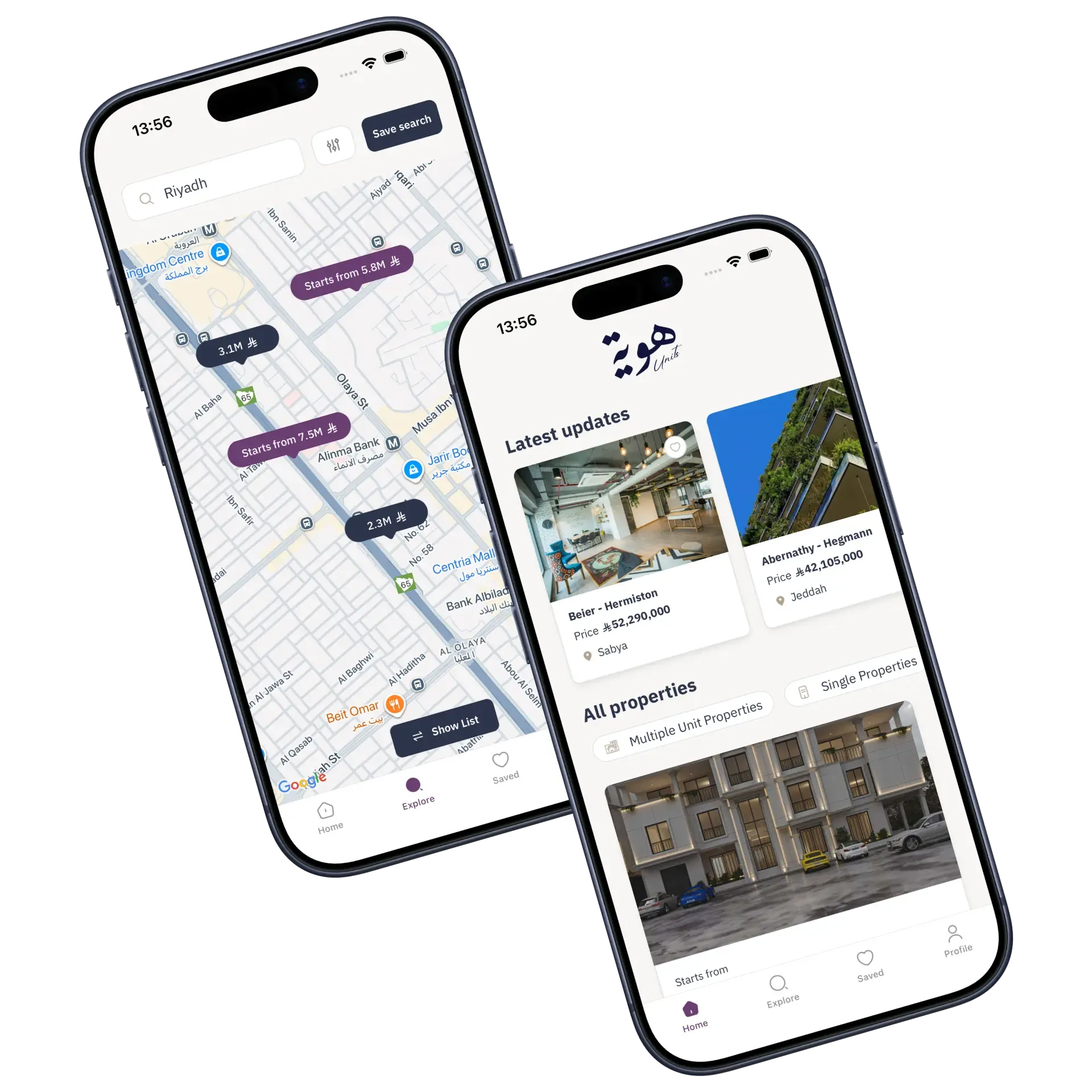
The buyer app opens on a map. Projects appear as price markers that group by province when the map is zoomed out and separate into individual projects as it zooms in. A buyer can type a neighbourhood and land on it, drag the map to a street and see everything for sale within it, and narrow the results with filters for price, area, rooms, building type, facade, use and amenities. The same filters work whether the buyer is looking at whole projects or at the units inside them.
A listing carries everything the developer has published. A gallery, a brochure and floor plan, a 360 tour where one exists, nearby places with distances, the amenities, the price with its tax and deposit broken out, and the payment plan as a timeline of instalments. A buyer who wants to talk first opens WhatsApp from the listing with a message already written in their language, and the developer receives a link straight back to the unit.
Arabic is the default language, and the whole interface mirrors for right to left reading down to the smallest control. Browsing, filtering and reading a listing need no account. A phone number is asked for at the point a buyer bookmarks, saves a search or starts a reservation, and never before.
Details that matter on a phone
- A search that comes back wholeA saved search stores the filters and the map region together, so opening it later returns the buyer to the same streets with the same criteria. The map also remembers where the buyer left it between sessions.
- A link that outlives the installThe link in the WhatsApp message is a deferred deep link. Anyone who opens it without the app is taken through the store install and lands on the right unit on first launch.
- Two directions, down to the digitsChevrons, tab indicators, switches and the digits of a one time code all mirror with the language, and switching language restarts the app so that every native component picks up the new direction.
The result is an app that does its work before asking for anything.
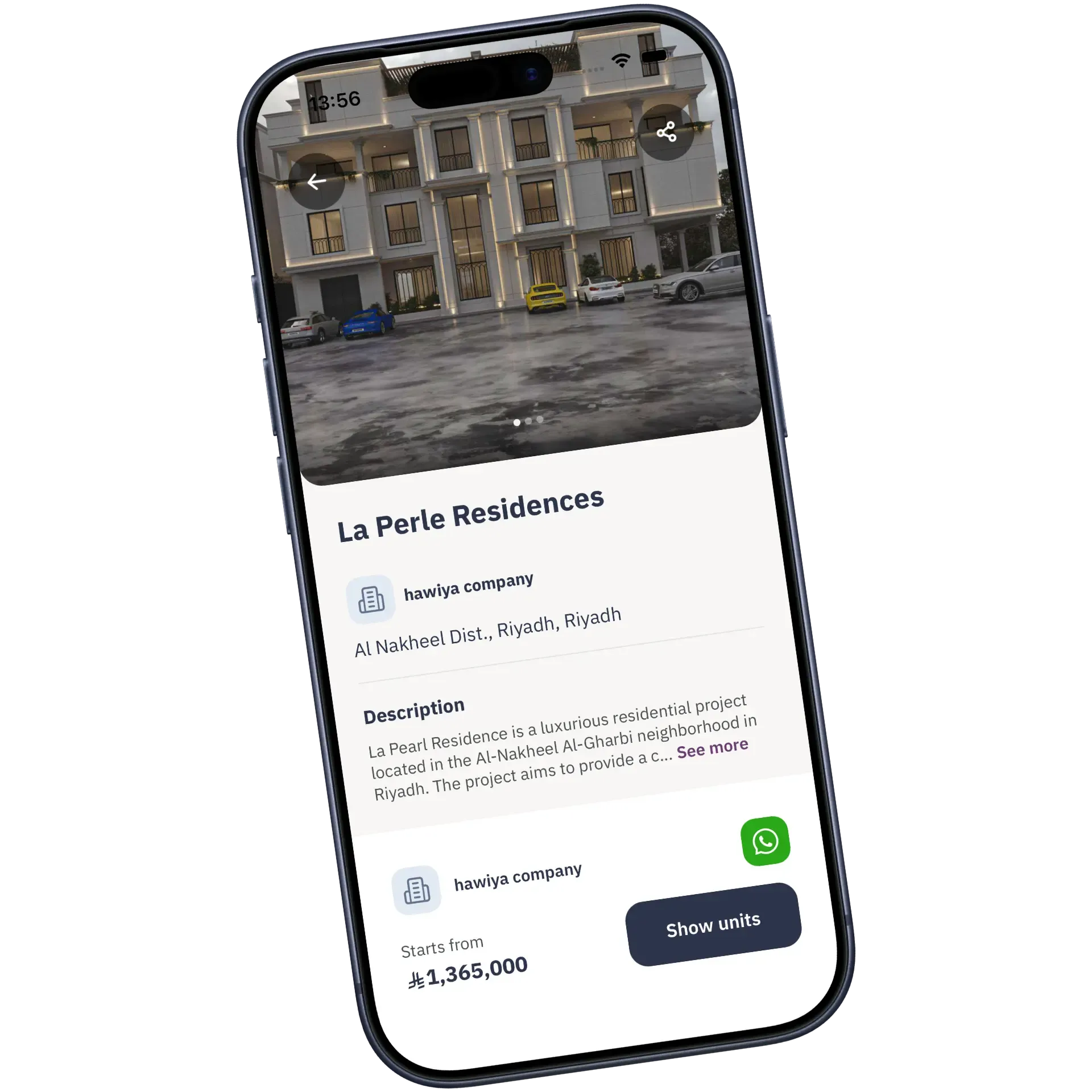
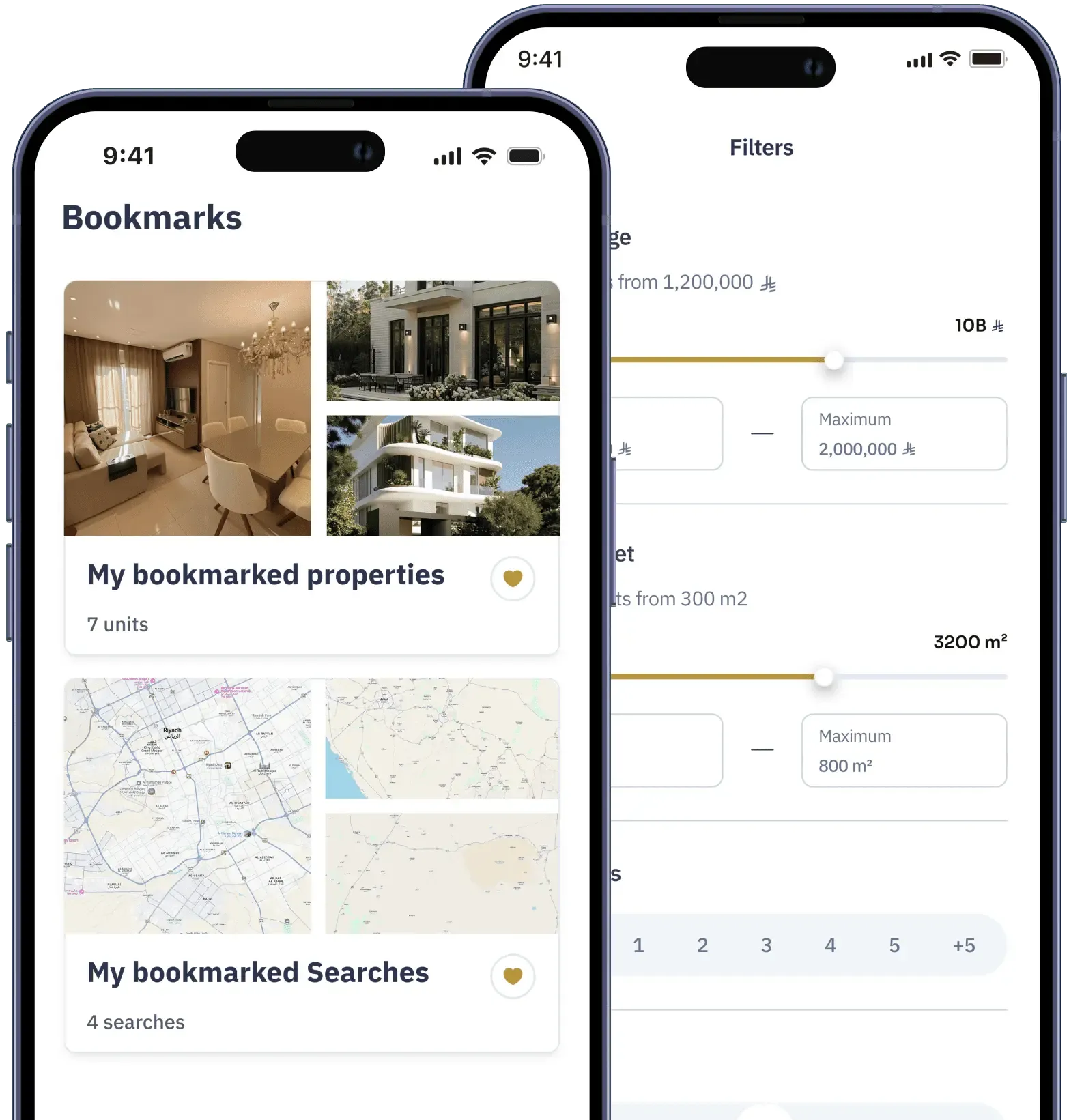
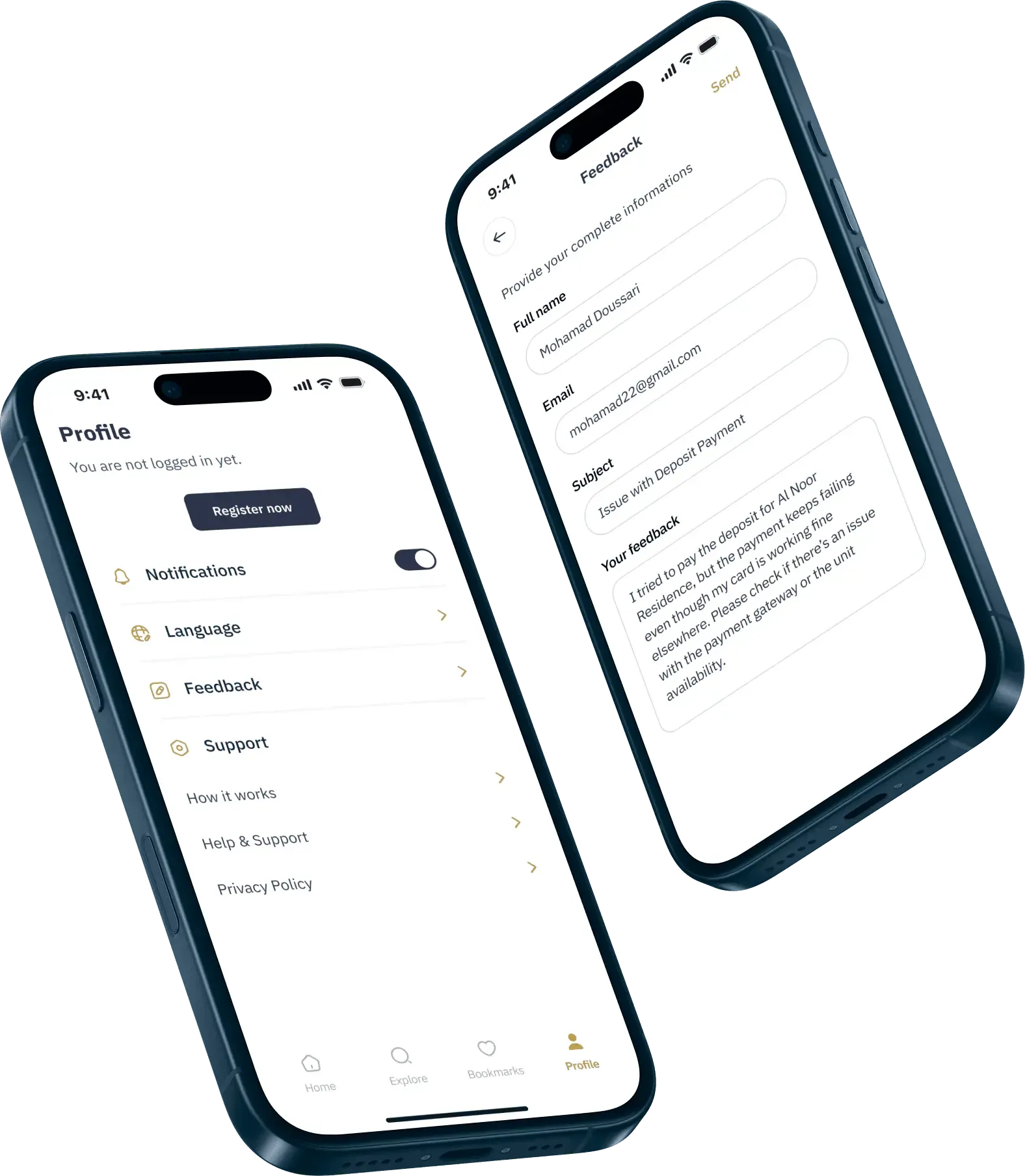
A listing, the bookmarks and filters, and the profile and feedback screens. Every screen exists in Arabic and English and mirrors with the language. Identity and Licensing
Nafath before the deposit, FAL before the listing
Nafath verification for buyers and developers, FAL licensing at onboarding, and a service that keeps identity data in the Kingdom.
Two identities matter in a reservation, the developer’s and the buyer’s, and the product checks both before money moves.
A developer registers, completes a profile in Arabic and English, verifies through Nafath and then creates their company with its FAL license number and a copy of the license. The registration lands in a queue in the back office, where the company’s team opens the document and approves or rejects the developer. Until approval, nothing can be published. Every listing then carries its publication license number and mediation contract number, checked as the developer enters them.
A buyer verifies through Nafath at the moment they start a reservation: they confirm the match between the numbers shown in the two apps, the platform receives the confirmation, and the reservation continues. It happens once, and every later reservation skips it.
Where that confirmation lands mattered. Identity data about Saudi citizens and residents belongs in the Kingdom, so the service that receives it is deployed in Google Cloud’s Saudi region, separate from the rest of the platform.
Built into the flow
- Nothing taken on trustNafath’s confirmation arrives as a signed token, and the server verifies the signature against Nafath’s published keys before it acts on it.
- The unhappy pathsA verification can already be in progress, expire or be rejected, and each case has its own screen and its own recovery rather than a generic error.
- Identity as authorizationThe backend distinguishes a signed in user from a verified one. Paying a deposit or requesting a refund is only possible for verified users, so the rule holds even if a screen is bypassed.
Licensing and identity became something the product does on the buyer’s behalf rather than paperwork exchanged afterwards.
Buyer app
On the buyer’s phone
- National ID entered
- Card or Apple Pay tokenized on the device
- 3-D Secure inside the app
Nafath
National identity service
- Two-digit match in the Nafath app
- Signed callback
- Received by a service in the Kingdom
Moyasar
Local payment gateway
- mada, Visa, Mastercard, Apple Pay
- Webhook with a shared secret
- Payment fetched again by id
Platform server
Trusts nothing unverified
- Signature checked against published keys
- Payment confirmed before any change
- Deposit moved one state at a time
What a deposit can be
- Pending
- Received
- Refund requested
- Refunded
A pending deposit can also fail. Nothing moves a deposit except a transition on the deposit itself, and the transition to received waits for the payment to be confirmed with Moyasar.
The reservation path. The buyer proves who they are through Nafath and pays through Moyasar, and the server verifies both results independently before a unit is marked as reserved. Deposits and Payments
A flat deposit, confirmed twice
A flat deposit paid by mada or Apple Pay through Moyasar, confirmed server side and tracked as an explicit state machine.
A reservation is a deposit of 500 Saudi riyals, the same on every listing, so a buyer knows the number before they start. They pay with a mada card or, on iPhone, with Apple Pay, without leaving the app, and land on a success screen or on a failure screen that says why.
The deposit is confirmed twice. Moyasar tells the platform a payment went through, and the platform checks that directly with Moyasar before it holds the unit. A notification that has been tampered with or delayed cannot reserve an apartment, and two buyers reaching for the same unit in the same second cannot both get it.
Refunds follow the rule settled in discovery. For 24 hours after the deposit is received, the buyer’s reservation screen shows the deadline and a cancel button. A cancellation is a refund request. The developer sees it in their deposits inbox, the refund is issued through Moyasar, and the buyer is notified in their language when it completes, as they are when a payment succeeds or fails.
Under the payment screen
- Card details never touch the platformCard numbers and Apple Pay tokens go from the device to Moyasar directly, with 3-D Secure handled inside the app.
- Five states and one way to changeA deposit is pending, received, failed, refund requested or refunded, and every change is a named transition rather than a field someone can set.
- Money stored as moneyAmounts are stored in the smallest unit, the transaction tax is calculated and kept with each listing, and every price on screen carries the new Riyal symbol.
Developer Portal and Back Office
Inventory in, leads out
A listing wizard, bulk import from spreadsheets and a deposits inbox for developers, with an approval queue for the company.
Developers work at a desk, on inventory measured in hundreds of units, and the portal is designed for that. A listing is created step by step, details, configuration, gallery, virtual tour and review, with a draft saved at any point and a warning before leaving with unsaved changes. Addresses run from province to city to neighbourhood and finish with a pin on a map. Amenities, nearby places, brochures and floor plans are attached in place.
A project with many units does not have to be entered by hand. The developer fills a spreadsheet and drops it in the portal. Every row is checked against the same rules as the form, errors are listed by row before anything is saved, and images embedded in the spreadsheet are attached to the right unit. Units can then be published, hidden, marked sold or deleted in bulk.
Payment plans are structured rather than free text. A developer defines instalments as amounts and days, and the portal will not accept a plan that does not add up to the price less the deposit, so what a buyer sees as a timeline is always true.
The portal also closes the loop. Each listing shows its views and bookmarks, and a deposits page lists every reservation with the buyer’s name and phone, the amount, the method and the date, with totals received and refunded. A developer’s first verified lead arrives with money attached.
The back office belongs to the company’s team. It holds the queue of developers waiting for approval with their FAL documents, every listing across every developer, the WhatsApp accounts that inquiries are routed to, the banks shown to buyers for financing, and a form for notifications to every user.
Platform and Release
Six applications that stay in step
Six applications, typed end to end and live on both stores.
The buyer app is built with Expo and React Native, and the developer portal, the back office and the landing site with Next.js, all in TypeScript. They share a design system and a set of Arabic and English translations, so a change made once reaches every application, and a mistake in one place is caught before it reaches any of them.
How the platform holds together
- Typed end to endThe mobile app and both dashboards reach the server through a typed client, so a change to it shows up as an error at build time in every application that uses it.
- Two languages, checked by the machineEvery application carries Arabic and English message files, and the build fails when a key exists in one and not the other. Emails, notifications and labels are translated on the server in the language the user has chosen.
- Tested end to endAutomated suites drive the developer portal, the back office and the landing site in a browser, and the mobile app on a device through sign in, search, bookmarks and identity verification, against a test environment.
- Seen in productionErrors are captured on every surface, environments are separated for development, staging and production, and mobile updates that do not touch native code ship without waiting for a store review.
It is a platform the client can keep building on, and one where the next government integration already has a place to go.
03 · The engagement
From a first benchmark to both stores.
Hawyia Units is live on the App Store and Google Play, and the landing site introduces it to buyers in Arabic and English.
WeaveLines carried Hawyia Units from the first benchmark to two store releases in six months. The regulatory work, Nafath, FAL licensing and payments through Moyasar, was designed into the product rather than bolted on, and what shipped is a bilingual platform the company keeps building on. It is the approach we bring to every engagement, so if you are building a marketplace in a regulated market, talk to us.
Keywords
- Real estate marketplace
- Figma
- React Native
- Expo
- Next.js
- TypeScript
- Postgres
- Nafath
- FAL license
- Moyasar
- mada
- Apple Pay
- Arabic and RTL
- Saudi Arabia